Microsoft Teams vs Zoom: Which One Should a Small Business Pay For?
If you're already on Microsoft 365, Teams is probably already paid for. Here's when Zoom is worth adding, and when it's not.

“Should we use Teams or Zoom for meetings, or do we need both?” This comes up often in small businesses, especially ones where some clients prefer Zoom and internal team communication runs through Microsoft 365.
The short version: you probably don’t need both.
Short answer
If your business already pays for Microsoft 365 Business Basic, Standard, or Premium, Teams is already included. Paying separately for Zoom on top of that is almost always redundant.
Zoom only makes sense as the primary platform if your team works heavily with external clients who prefer it, or if you don’t use Microsoft 365 at all. For teams under 10 people, Zoom’s business plans require a 10-license minimum, which makes Teams or a basic Teams Essentials subscription the more practical and cheaper choice.
Where each option is stronger
Teams is stronger when:
- Your team is already inside Microsoft 365 (Word, Excel, Outlook, SharePoint)
- You want chat, files, and meetings in one app rather than switching between Slack + Zoom + email
- You need structured channels for different projects or departments
- You want to avoid paying for a second tool
Zoom is stronger when:
- You meet frequently with external clients or partners who primarily use Zoom
- You need webinar capabilities for large external audiences
- You’re looking for a standalone VoIP phone system (Zoom Phone)
- Your team doesn’t use Microsoft 365 and wants a simpler video-only tool
Cost and licensing
| Option | Price | Key limits |
|---|---|---|
| Teams (included in M365 Basic) | $6/user/month | Chat + meetings + Teams features |
| Teams Essentials | $4/user/month | Meetings only, no M365 integration |
| Zoom Free | Free | 40-minute group meeting limit |
| Zoom Pro | $13.32/user/month (annual) | No 10-user minimum, longer meetings |
| Zoom Business | Requires 10-user minimum | Full business features |
Note: Microsoft is raising all M365 prices in July 2026. Business Basic goes from $6 to $7/user/month, Standard from $12.50 to $14. Zoom pricing has not changed as of this writing.
The Zoom free tier is why many small teams sign up. The 40-minute limit on group calls pushes people toward paid plans quickly. Zoom Pro at $13.32/user/month is about three times the cost of Teams Essentials ($4/user/month) for equivalent core video meeting functionality.
Zoom Business requires a 10-license minimum. You can’t buy 6 seats. For a team of 7 or 8, that means paying for seats you don’t need, or staying on Zoom Pro instead.
Security and admin controls
Both platforms have adequate security for most small businesses.
Teams benefits from being inside the Microsoft 365 security and compliance stack. If you have Microsoft 365 Business Premium, meetings benefit from the same security policies applied to email and files. Admin controls for Teams are managed through the same Microsoft 365 admin center you use for everything else.
Zoom’s admin controls are separate from any other platform you use. This isn’t a dealbreaker, but it means another dashboard to check and another set of policies to maintain.
Best fit by team type
Already on Microsoft 365: Use Teams. Cancel Zoom if you have it running in parallel.
Under 10 employees, not on Microsoft 365: Zoom Pro is the most accessible paid option. The free tier works fine for quick calls; pay only when the 40-minute limit becomes a real problem.
10+ employees, not on Microsoft 365: Evaluate whether the total cost of Zoom Business ($13.32 × 10+ users) approaches the cost of a Microsoft 365 Business Basic plan that includes Teams, Exchange email, and OneDrive.
Heavy external client meetings: Zoom’s meeting experience is slightly more polished for external guests (no Microsoft account required, familiar interface). If client-facing meetings are a core part of your work, the extra Zoom cost may be worth it even alongside Teams.
On Google Workspace: Google Meet is included in all Workspace plans and is the right default. It handles 1:1 and group calls up to 500 participants, supports recordings, and requires no additional cost. Before paying for Zoom, verify that Meet doesn’t already cover your needs.
The hidden cost of running both
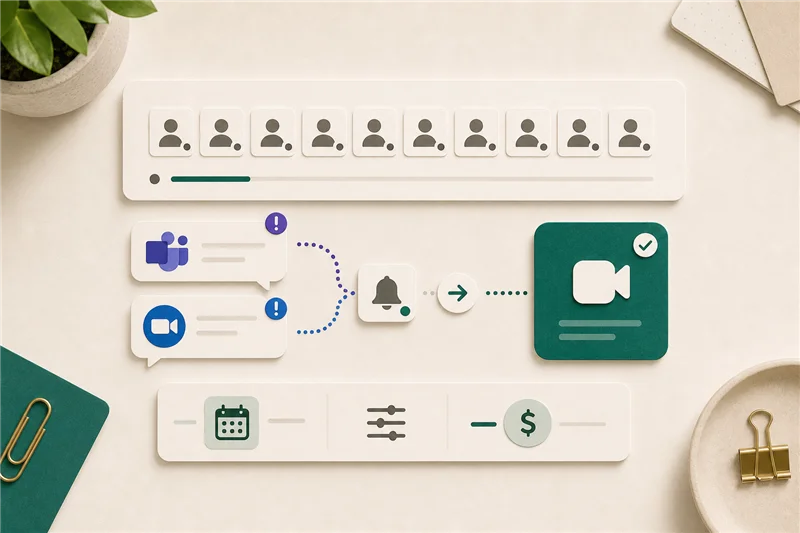
Many small businesses end up with Teams for internal chat and Zoom for external calls. This creates:
- Two separate apps and two sets of notifications
- Employees switching context between platforms
- Two calendaring integrations to maintain
- Two billing accounts to track
If you’re paying for both and using each for distinct purposes, the overlap is a real operational cost, not just a line item.
Sources
More from the journal
Keep reading the surrounding signals

Why Outlook Keeps Asking for Your Password (and How to Stop It)
Repeated Outlook password prompts are almost always caused by stale saved credentials or an outdated sign-in method — both fixable in minutes.
Read note
What to Do When an Employee Leaves: An IT Offboarding Checklist
Block the account and revoke sessions first, within minutes, not days. Everything else follows in order. Here's the full checklist for Microsoft 365 and Google Workspace.
Read note
How to Recognize and Respond to a Phishing Attack
The first 60 minutes after a suspected phishing click matter most. Block the account, revoke sessions, change the password, in that order.
Read note